Arjun Portfolio
Go back to home page
After some quality time with learning and embracing my current job role (it's been almost 2 years, damn!!), I decided to start hunting for a new opportunity.
As employers, we can't seriously just stick to one job forever. After a certain time period, every individual has to move from their comfort zone and push for better opportunities and, of course, better pay.
Context
The process here is remarkably straightforward. I approached it with a free-flow method, aiming to comprehend the problem and generate viable solutions. The majority of the design components were crafted using the Atomic design model.
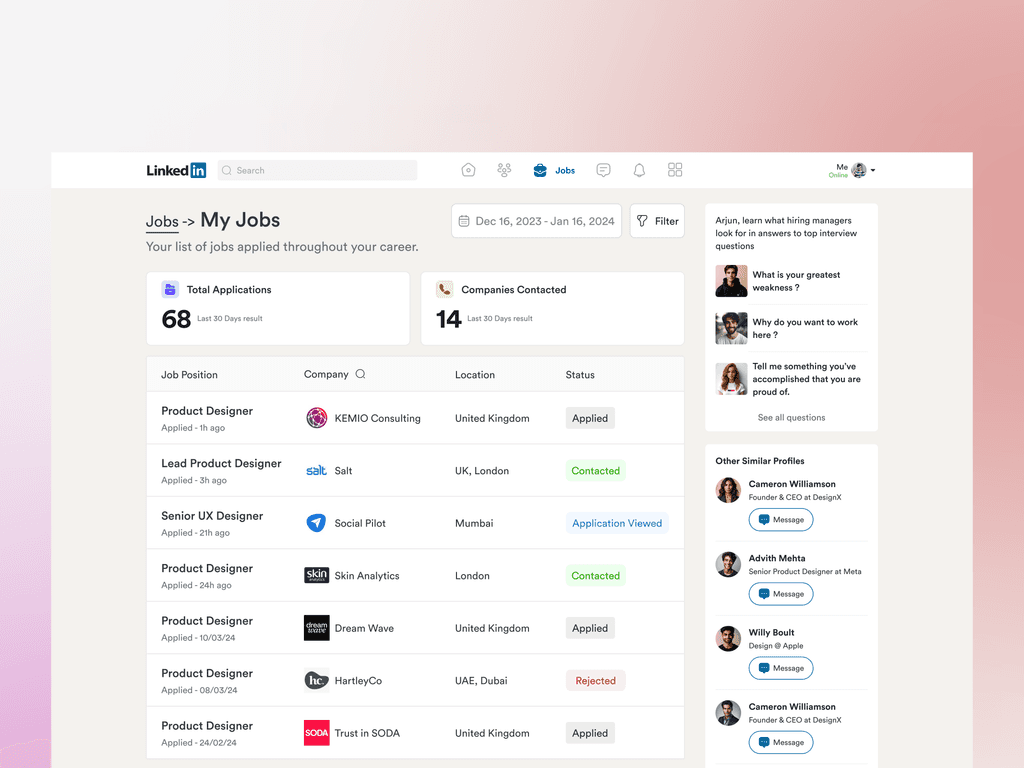
Users are having difficult time tracking their job applications within linkedin web apps.
Currently it's messed up with not much information architecture. Users must be provided with some structured data to analyse their applications and understand their application acceptance criteria.

Linkedin doesn't showcases the prefered jobs in users profile.
The first weird thing was when I tried to search for product designer job positions. It sometimes throws me some random sales or manager roles, which doesn't make sense.
Also Important details like salary budget and what's the job accommodation type should be displayed upright as that will help candidates to decide whether to move forward with applying for jobs or not. This will help save time to decide or filter out jobs.

Solutions
So the solution would be to bring those personalized results upfront rather than adding some bs jobs which i don't want. This way users would feel like there has been some personalisation after all. Also categories it on the basis of location and preferred jobs.
After sharing the screens with my friends, they suggested that there was too much detail for a single subscription on the front screen. To enhance the design, I decided to prioritize displaying the number of unused subscriptions first. This would capture users' attention and assist them in realizing the extent of their spending on unused subscriptions.

Solutions
So here what I have done is simply listed down all applications in order and given status to each of the applications which would help candidates identify different applications and give them a clear picture of what's going on. This will help them to save time from preparing excel sheets for each application and what their current scenarios are. In this way linkedin can help candidates to save time and can gain more users possibly this would kill competitors with their USP being now in networking and job application tracking.
After sharing the screens with my friends, they suggested that there was too much detail for a single subscription on the front screen. To enhance the design, I decided to prioritize displaying the number of unused subscriptions first. This would capture users' attention and assist them in realizing the extent of their spending on unused subscriptions.